Overview
Looking for a fast, reliable way to translate your English eLearning content into Spanish? Doctor eLearning makes it effortless. Whether you’re working with SCORM packages, XLIFF files, or Articulate DOCX exports, our platform handles it all — no technical headaches, no formatting loss, just clean, accurate translations ready to publish.
With English to Spanish eLearning translation built directly into your workflow, you can launch multilingual training programs in a fraction of the time it normally takes.

Why Choose Doctor eLearning for Spanish Translation?
Doing eLearning translation manually is slow, expensive, and prone to errors — broken tags, missing variables, mismatched formatting. Doctor eLearning solves this by automating the entire process while preserving course structure, interactivity, and multimedia elements.
Key benefits include:
- Faster turnaround — translate full courses in minutes, not weeks
- Cost-effective scaling — reduce dependency on manual translators for every language pair
- Consistency across courses — same terminology and tone maintained throughout your training library
- Format-safe output — SCORM, XLIFF, and DOCX files stay fully compatible with your original authoring tool
Benefits of English to Spanish Translation
With Doctor eLearning, you can quickly translate SCORM, XLIFF, and DOCX files with just a few clicks. Enjoy faster turnaround times, cost-effective multilingual content, and seamless integration into your eLearning workflow. Ensure accuracy and consistency across all translated materials while reducing manual effort.
How the Translation Workflow Works
DOCX Translation (Articulate Storyline Files)
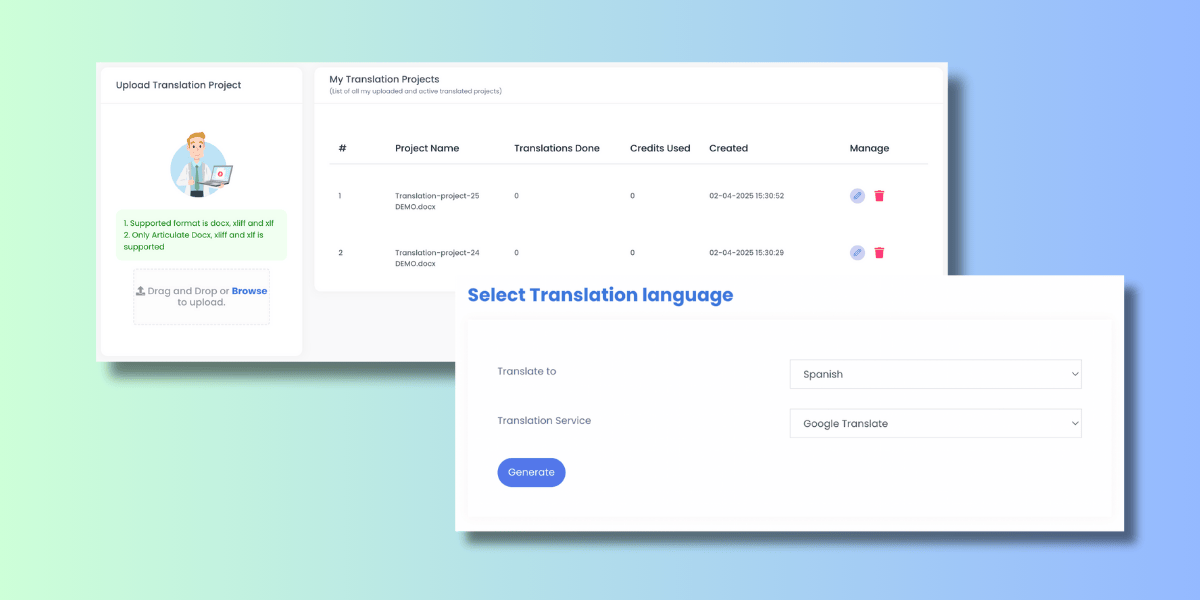
Upload your Articulate DOCX translation export, select Spanish as the target language, and download a translation-ready file — perfect for republishing your course in Spanish without touching the original project structure.
XLIFF Translation
Simply drag and drop your .xliff or .xlf file. The system instantly validates the file and processes it using advanced machine translation, giving you a fully translated XLIFF file that’s 100% compatible with your original authoring tool — with all interactions and multimedia elements intact.
Steps to Translate Docx & Xliff English to Spanish
- Upload your file
- Select English as the source language
- Choose Spanish as the target language
- Click Translate and let the engine process your file
- Download your translated file — ready to use immediately
Real-World Use Case
A multinational company expanding operations into Spanish-speaking markets needs to roll out leadership training, cross-cultural communication modules, and regional compliance courses. Instead of hiring translators for every file, they use Doctor eLearning to convert their English eLearning content into Spanish while preserving specialized vocabulary and company-specific terminology. This shortens onboarding time for new regional offices and ensures every employee — regardless of location — receives training in their native language.
Why Teams Trust Doctor eLearning
- Fast, accurate machine-assisted translation
- Support for SCORM, XLIFF, and DOCX formats
- Built specifically for eLearning — not generic document translation
- Fully compatible output that works with your existing authoring tools
Start Your English to Spanish eLearning Translation Today
Ready to make your training content accessible to Spanish-speaking learners? Upload your file above and see how quickly you can translate SCORM, XLIFF, and DOCX files without losing quality or structure. Explore more resources in our Translation category to learn about supporting additional languages.
Frequently Asked Questions (FAQ)
1. What file formats does Doctor eLearning support for Spanish translation?
Doctor eLearning supports SCORM, XLIFF (.xliff and .xlf), and Articulate DOCX files, making it easy to translate courses built in most major authoring tools.
2. How long does it take to translate an eLearning course from English to Spanish?
Depending on file size, most translations are completed within minutes. This is significantly faster than traditional manual translation, which can take days or weeks.
3. Will my course interactions and multimedia elements be preserved after translation?
Yes. Doctor eLearning is built specifically for eLearning files, so all interactions, variables, and multimedia elements remain intact in the translated output.
4. Is the translated XLIFF file compatible with my original authoring tool?
Yes, the translated XLIFF file is 100% compatible with your original authoring tool, allowing you to re-import it without any formatting issues.
5. Do I need technical skills to use Doctor eLearning?
No. The process is simple — upload your file, select source and target languages, click translate, and download. No coding or technical setup required.
Conclusion
Expanding your training programs into Spanish-speaking markets doesn’t have to be slow or expensive. With Doctor eLearning, translating your English eLearning content into Spanish becomes a simple, fast, and reliable process — whether you’re working with SCORM packages, XLIFF files, or Articulate DOCX exports. From preserving course interactions to ensuring 100% compatibility with your authoring tool, Doctor eLearning removes the usual friction of multilingual content creation.
If you’re planning to scale your training across Spanish-speaking regions, now is the time to simplify your workflow. Upload your file today and experience how quickly your courses can go global.
