
Doctor eLearning: English to Hindi Language Translation Guide
If you’re looking for a straightforward doctor eLearning language to Hindi translation workflow, here’s the short answer: upload your XLIFF or DOCX file, pick Hindi as the target language, and Doctor eLearning returns a fully translated, structurally intact file within minutes, no source files, no manual copy-paste, and no broken animations.
Reaching India’s Hindi-speaking workforce means more than swapping words. It means preserving the technical structure of your course while making the language feel natural to a Hindi-speaking learner. English to Hindi eLearning translation with Doctor eLearning does exactly that, combining AI-driven engines with full support for XLIFF and DOCX formats, and it runs entirely in the browser, so you can translate English to Hindi on any laptop without installing anything.

What Is Doctor eLearning’s English to Hindi Translation Process?
It’s an automated pipeline that reads the text inside your course file, sends it through a translation engine, and writes the Hindi text back into the exact same structure, so nothing about the course’s code, layout, or interactivity changes. You never touch the source project file. For background on how this fits into a broader localization workflow, see our guide to eLearning translation services.
In practice, there are two file paths:
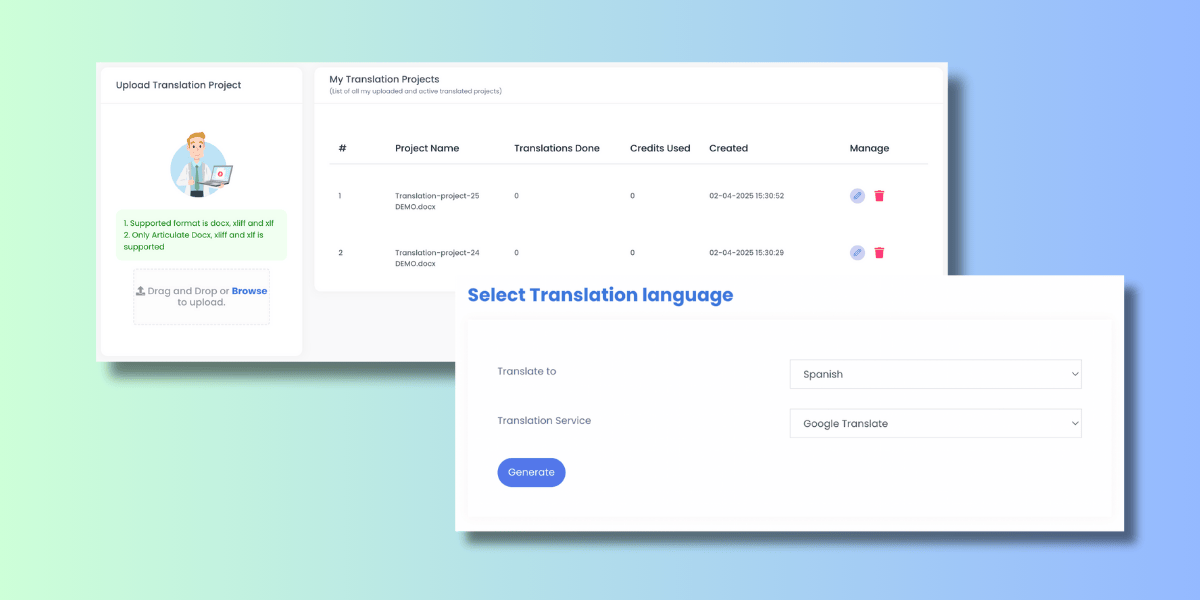
DOCX Translation: Upload your Articulate DOCX export, select Hindi as the target language, and download a translation-ready file, no manual copy-pasting required. This is also the path to use if a search brought you here looking for “english to hindi translation in word,” since DOCX and Word documents use the same underlying format.
XLIFF Translation: Drag and drop your .xliff or .xlf file for instant validation. Choose your engine, Google Translate for fast, broad-language coverage, or DeepL for advanced neural accuracy. Download your translated XLIFF, fully compatible with your original authoring tool, with all course interactions and multimedia preserved. If you want to check word counts before you translate, the XLIFF word count tool guide covers that step.
What Does SCORM Mean in Hindi Translation Projects?
SCORM stands for Sharable Content Object Reference Model, the global packaging standard most corporate training courses use. It is not a word that gets translated: when you translate a course to Hindi, “SCORM” stays as SCORM in the manifest and tracking files, while only the visible learner-facing text changes language.
Doctor eLearning parses SCORM packages so that translation touches display text only, the manifest, tracking calls, and completion data stay untouched, which is why a Hindi version of a SCORM course still reports correctly to your LMS. For a deeper look at how SCORM packages are structured and fixed, see our complete guide to SCORM content.
Can You Translate English to Hindi PDF, DOCX, and XLIFF Files?
Doctor eLearning translates DOCX and XLIFF files directly. If your source material is a PDF, export or convert it to DOCX first, most authoring tools and PDF editors support this, then run it through the same upload-translate-download workflow to get an English to Hindi file you can turn back into a PDF afterward. This avoids needing a separate PDF-only translation tool and keeps formatting consistent with the rest of your course files.
If your source is an Articulate Storyline 360 project, the Storyline 360 DOCX translation guide walks through the export step in detail before you bring the file to Doctor eLearning.
What Are the Benefits of English to Hindi eLearning Translation?
The main benefit is content in Hindi that reads naturally to learners, not machine-literal Hindi that stalls comprehension, delivered without the cost or delay of a manual agency. Specifically, Doctor eLearning gives you:
- Faster turnaround compared to manual translation agencies
- Cost-effective multilingual course delivery
- Consistent terminology across every module
- Seamless fit into your existing eLearning workflow
- Reduced manual QA effort after translation
How Do You Translate DOCX and XLIFF Files From English to Hindi?
Five steps, start to finish:
- Upload your file to Doctor eLearning.
- Select ‘English’ as the source language.
- Choose ‘Hindi’ as the target language.
- Click on ‘Translate’ and wait for processing.
- Download your translated file instantly.
How Does This Work for a Real Corporate Training Rollout?
Consider a multinational company expanding operations in India. Their leadership training, compliance modules, and cross-cultural communication courses need to reach Hindi-speaking employees accurately. With English to Hindi eLearning translation through Doctor eLearning, specialized vocabulary and company policies stay technically precise, helping teams onboard faster and operate smoothly across regions.
Because Doctor eLearning also handles hindi to english translation, compliance teams can translate learner feedback, quiz responses, or completion notes back into English for centralized reporting, without a second tool. And since none of this requires you personally to speak Hindi, an instructional designer who only speaks English can manage the entire rollout end to end. For teams also managing Hindi content alongside other Indian languages, our Hindi to Tamil comparison covers a related regional translation path.
Why Choose Doctor eLearning Over Manual Translation Agencies or Google Translate?
Manual translation agencies can take weeks and cost significantly more, and free tools like Google Translate on their own don’t understand SCORM or XLIFF structure. Doctor eLearning offers an automated workflow built specifically for instructional designers and corporate trainers:
- Format Integrity: Your Hindi output keeps every trigger, animation, and interaction working exactly as the English original did.
- Dual-Engine Power: Pick Google Translate for speed across languages, or DeepL for richer contextual accuracy in Hindi.
- Workflow Efficiency: What once took days now takes minutes, drag, drop, translate, and download in a single session.
| Feature | Standard Translation | Doctor eLearning |
|---|---|---|
| Speed | Manual & slow | Instant / near-instant |
| File Support | Plain text only | XLIFF, .xlf, DOCX |
| Technical Risk | Corrupts XML/code | 100% tool compatibility |
| Accuracy | Varies | DeepL neural integration |
Try Doctor eLearning free, upload your XLIFF or DOCX file and get your Hindi translation in minutes.
FAQ: English to Hindi eLearning Translation
What is Doctor eLearning’s language to Hindi translation, exactly?
It’s an upload-translate-download workflow: you bring your DOCX or XLIFF course file, pick Hindi as the target language, and Doctor eLearning returns a translated file with the same structure, animations, and interactivity intact, usually within minutes.
What does SCORM mean in a Hindi translation project?
SCORM (Sharable Content Object Reference Model) is the packaging standard your course uses. It isn’t translated itself, only the visible text inside the course changes to Hindi, while the SCORM manifest and tracking data stay exactly as they were.
How do I get eLearning content in Hindi without rebuilding my course?
Upload your existing DOCX or XLIFF export to Doctor eLearning rather than rebuilding the course from scratch. The tool translates the visible text to Hindi and hands back a file that drops back into your original authoring tool.
Can I translate an English to Hindi PDF with Doctor eLearning?
Not directly. Convert the PDF to DOCX first, most authoring and PDF tools support this, then upload that DOCX to Doctor eLearning. You’ll get a Hindi file you can convert back to PDF afterward, without a separate PDF translation service.
Does Doctor eLearning support hindi to english translation as well?
Yes. The same workflow runs in both directions, so you can translate Hindi learner feedback, reports, or source content back into English for centralized review, using the same upload-translate-download process.
How do I translate English to Hindi on a laptop?
Doctor eLearning runs entirely in your browser, so any laptop works. There’s nothing to install: open the site, upload your file, choose Hindi, and download the result.
Do I need to speak Hindi to use this tool?
No. You don’t need to speak or read Hindi to run the translation. Select English as the source, Hindi as the target, and the engine handles the language conversion while you manage the file workflow.
Will translating to Hindi break my course animations or interactive triggers?
No. Doctor eLearning is format-aware, it translates only the visible text while protecting the underlying code that powers your interactions and multimedia, so a translated SCORM or XLIFF file behaves exactly like the original.
Conclusion
Expanding your training into India’s Hindi-speaking workforce shouldn’t mean weeks of manual work or broken course files. Doctor eLearning delivers English to Hindi eLearning translation that’s fast, technically sound, and linguistically accurate, preserving your SCORM, XLIFF, and DOCX structure every step of the way. Start your English to Hindi translation with Doctor eLearning today, and explore more in our Translation category.
